Overview
If you rent out a property through a management company or booking platform, you’ve probably assumed your address stays private until a guest books. Most listings are set up that way, and for good reason. An exact address makes it easy for a stranger to show up at an occupied house, or to figure out when a property is sitting empty between stays.
The reality is that a lot of booking websites only keep the address off the visible page. The data the site sends to a visitor’s browser often still has it, and sometimes it has a good deal more than that. I look at a lot of rental listings while matching them to properties, and I run into this often enough that owners should know about it.
How your listing data reaches a stranger’s browser
When someone opens your listing, their browser downloads more than the text and photos they see. Many booking sites also send a full record of the property behind the scenes, either in the page’s source code or in separate network requests the page makes while it loads. That record can include room counts, amenities, map coordinates and your full street address. The page then decides which of those details to show.
Anyone can see that record by opening their browser’s developer tools. It takes no special access and nothing you could reasonably call hacking. We walked through one example in From HTML to Address, where a cabin listing’s page source contained the property’s address even though the page itself only named the town.
The screenshots in this article show what that looks like on real listings. Each one shows the listing page as a visitor sees it, with the page source or developer tools open on top. The red boxes mark where the address appears in the data. We’ve blurred the addresses, contact details and anything else that would identify the property. Click any screenshot to open it full size.
Should this data reach the browser at all?
Not before a booking. Security researchers treat this as a known type of flaw. OWASP, the main reference for web application security, lists it in its API Security Top 10 as “Broken Object Property Level Authorization”: a site sends a visitor fields they aren’t entitled to and relies on the page not to display them.
It usually happens for ordinary reasons. Many booking sites add a block of structured data to each listing page so search engines can show the listing’s details in results. The standard format for this, schema.org, has a field for the street address, and some sites fill it in with the full address and unit number. Other sites build their pages from a block of data embedded in the page source, or load listing details from an API that returns the property’s whole stored record. Unless someone removes the private fields before the response is sent, they go out with everything else.
The fix happens on the booking company’s side. The site should check who is asking and leave the address out of the response entirely until there’s a confirmed booking, and send check-in details only to that guest.
Guesty
Guesty is one of the larger property management platforms, and a lot of managers use it to run their own direct-booking websites. I checked three direct-booking sites that run on Guesty in October 2026. On all three, a network request the listing page makes while loading returned the property’s full street address, even though the page itself showed only the town. I don’t know whether this applies to every site built on Guesty, but it was consistent across the ones I looked at.
This matters because managers often push repeat guests to their own site to avoid platform fees. Your manager can follow Airbnb’s address rules to the letter and still be publishing your exact address on their own website without realizing it.
Whimstay
Whimstay is a booking site that specializes in last-minute vacation rental deals. Some of its listings include the property’s full street address in the page source, even though the address isn’t shown anywhere on the page. It doesn’t happen on every listing, and an owner has no way to know whether theirs is affected without checking.
RedAwning
RedAwning is another large vacation rental platform, which both runs its own booking site and distributes listings to other sites. Its listing pages include a block of structured data for search engines, and that block contains the property’s full street address, including the unit number for condos. None of it appears on the page itself, but it’s there for anyone who views the source.
In the screenshot below, the page shows a condo’s photos, price and room counts, while the developer tools on the right show the structured data behind it. The address section lists the city, state and ZIP code, and the streetAddress line, marked in red, holds the street address and unit number. The map coordinates are just below it.
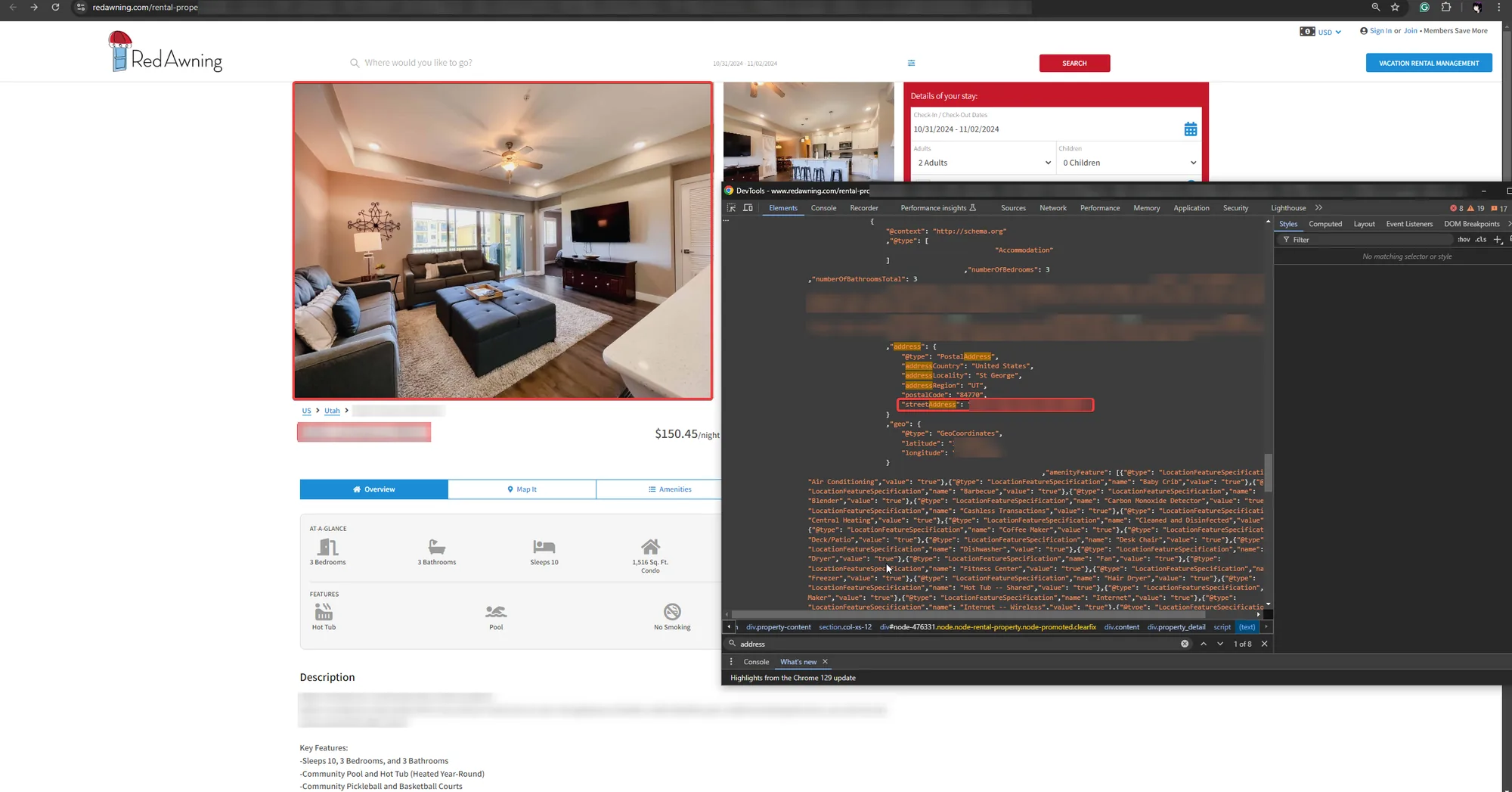
The page shows the town only. The structured data includes the street address, unit number and exact coordinates.
Evolve
Evolve is a large vacation rental management company. Until sometime in 2025, its listing data included details that should only ever go to a confirmed guest, in plain text that anyone could reach without booking. That included the host’s phone number, check-in instructions and door codes.
The screenshot below is from an Evolve listing in March 2025. A block of text in the page source starts with “PROPERTY ADDRESS”, followed by the full address and unit number, then “GUEST CONTACT” with a person’s name, phone number and email address. None of that appeared on the listing page. The same block of text continued past what fits in the screenshot, with the check-in instructions and door code for the property.
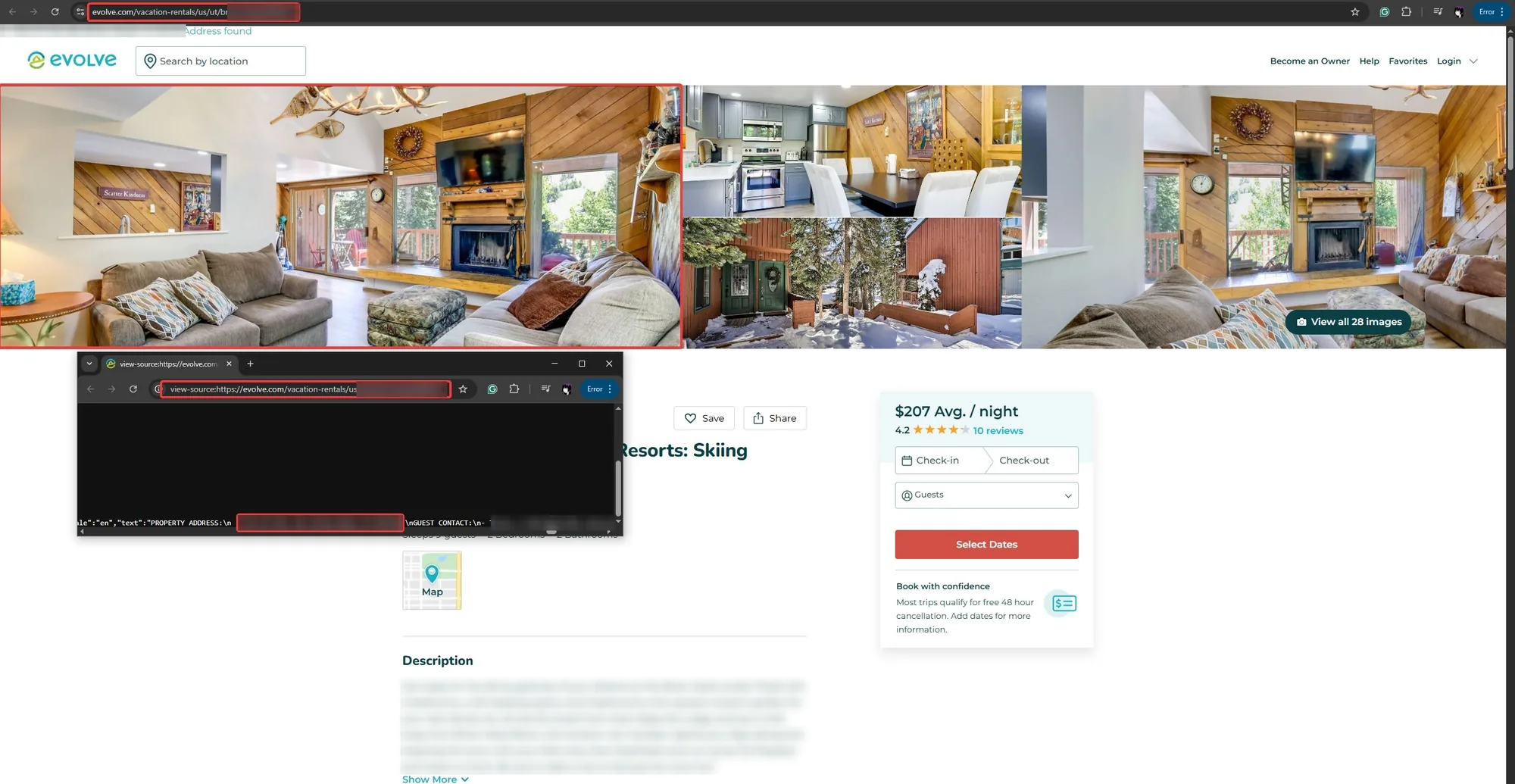
The page source contains the property address and a guest contact’s name, phone number and email. Further along, the same text included the check-in instructions and door code, which aren’t shown here.
This has been fixed for at least the past year. Evolve has also blocked its listing pages from being archived by the Wayback Machine, the Internet Archive’s record of old web pages. That matters because a fix only protects the live site. Copies of the old pages saved in an archive would still contain the same details, and blocking the archive means those copies can no longer be viewed there.
I’m including it because it shows how far the problem can go, and that it isn’t limited to small or careless operators.
That kind of exposure is a much bigger problem than an address. An address tells someone which house is yours, while check-in instructions can tell them how to get inside it, which puts both you and whoever is staying there at risk.
Smaller local booking sites
Beyond the national platforms, there are many smaller booking sites that focus on a single town or region, such as beach rental sites, mountain cabin directories and sites run by local management companies. In my experience, their security tends to be worse than the larger platforms’, and it’s common to find the full address in the page’s structured data, often with the unit number included.
The three examples below are management companies’ own booking sites in New Orleans, Louisiana, St. George, Utah and Angel Fire, New Mexico. Each page shows the listing’s name and photos without an address. In each page source, the structured data has a streetAddress line with the full address, and two of the three include the unit number.
New Orleans, Louisiana
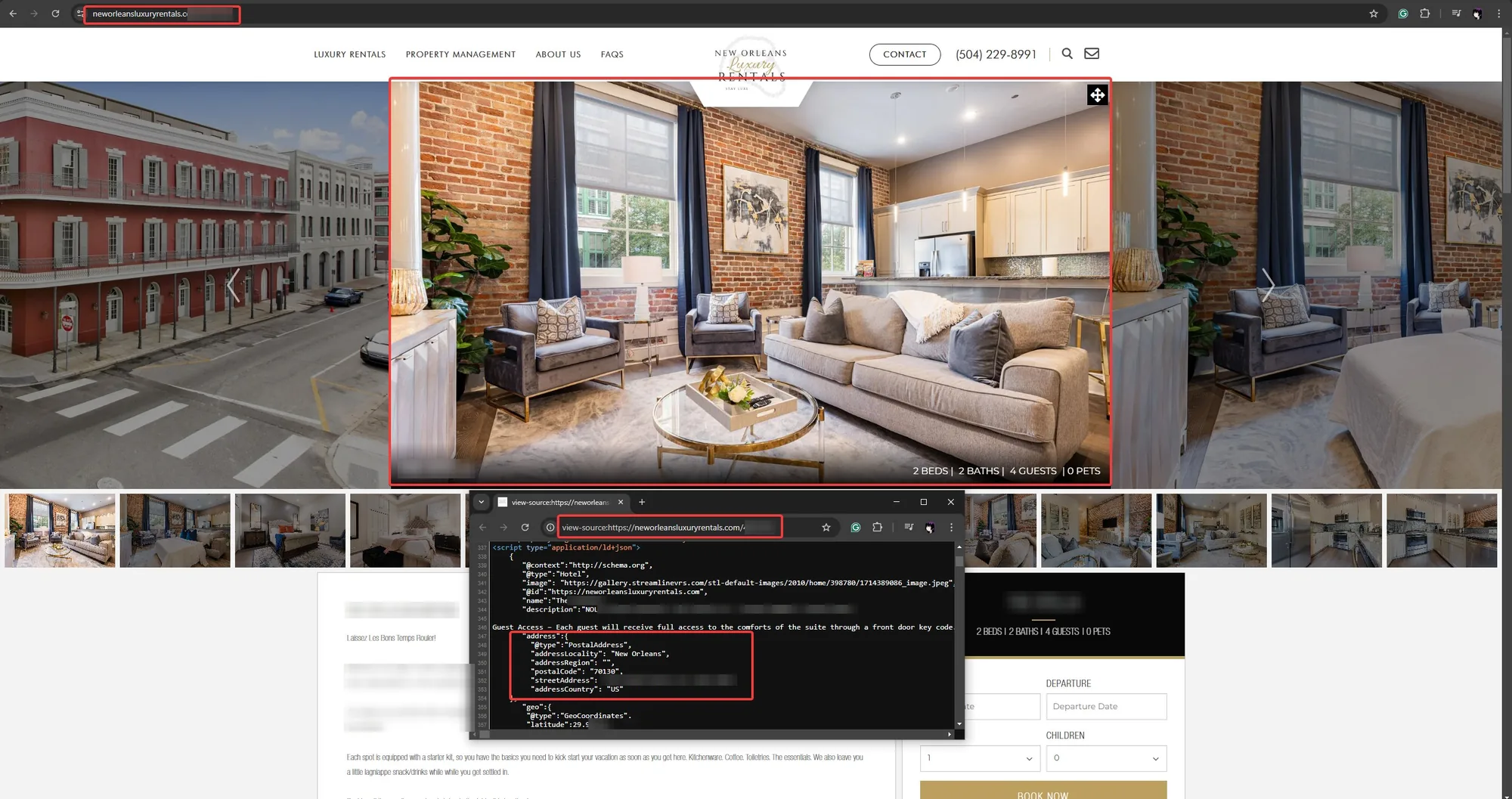
The structured data includes the street address with the unit number, and the map coordinates below it.
St. George, Utah
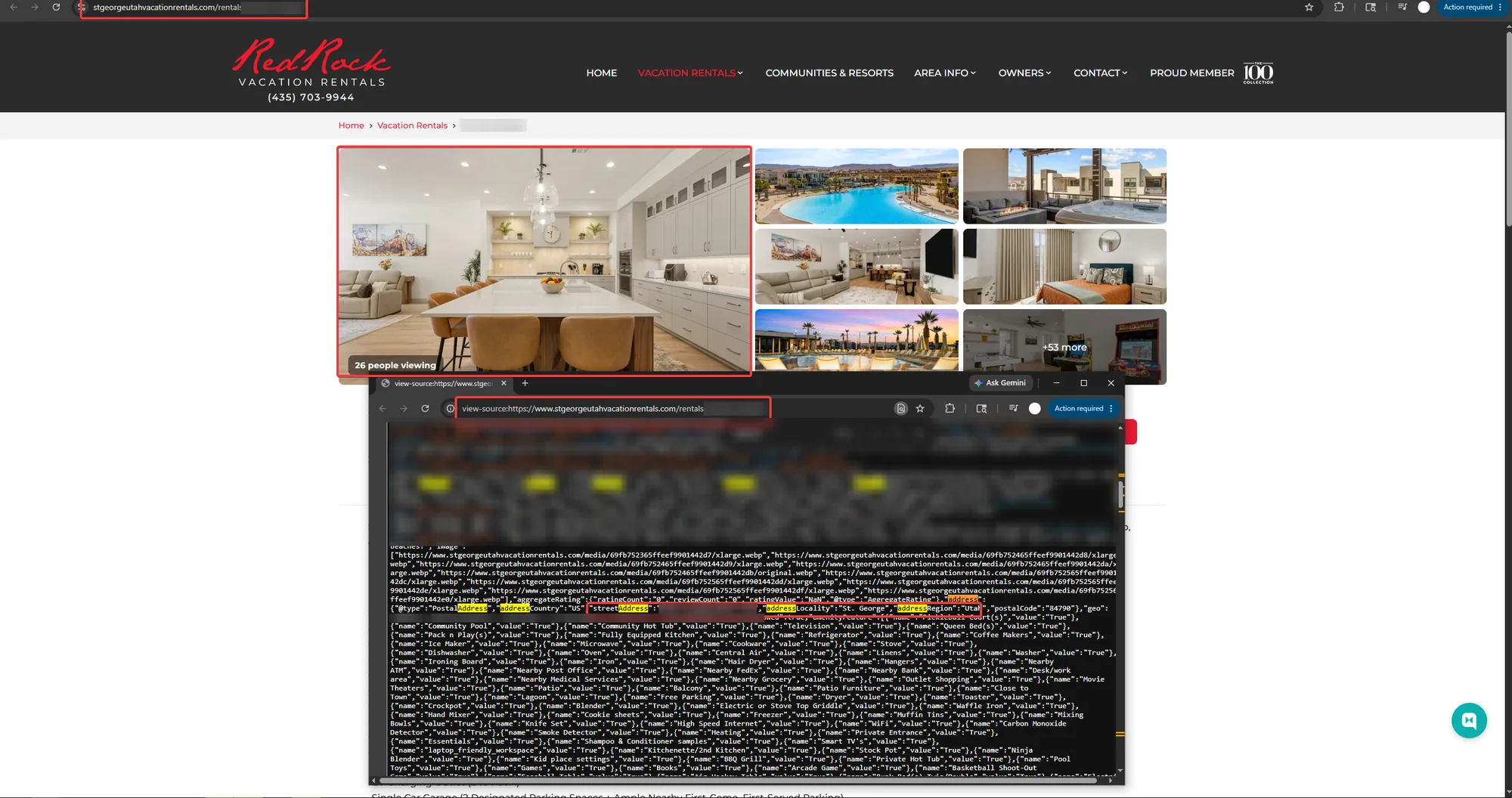
The streetAddress field, marked in red, sits in the middle of a long block of listing data.
Angel Fire, New Mexico
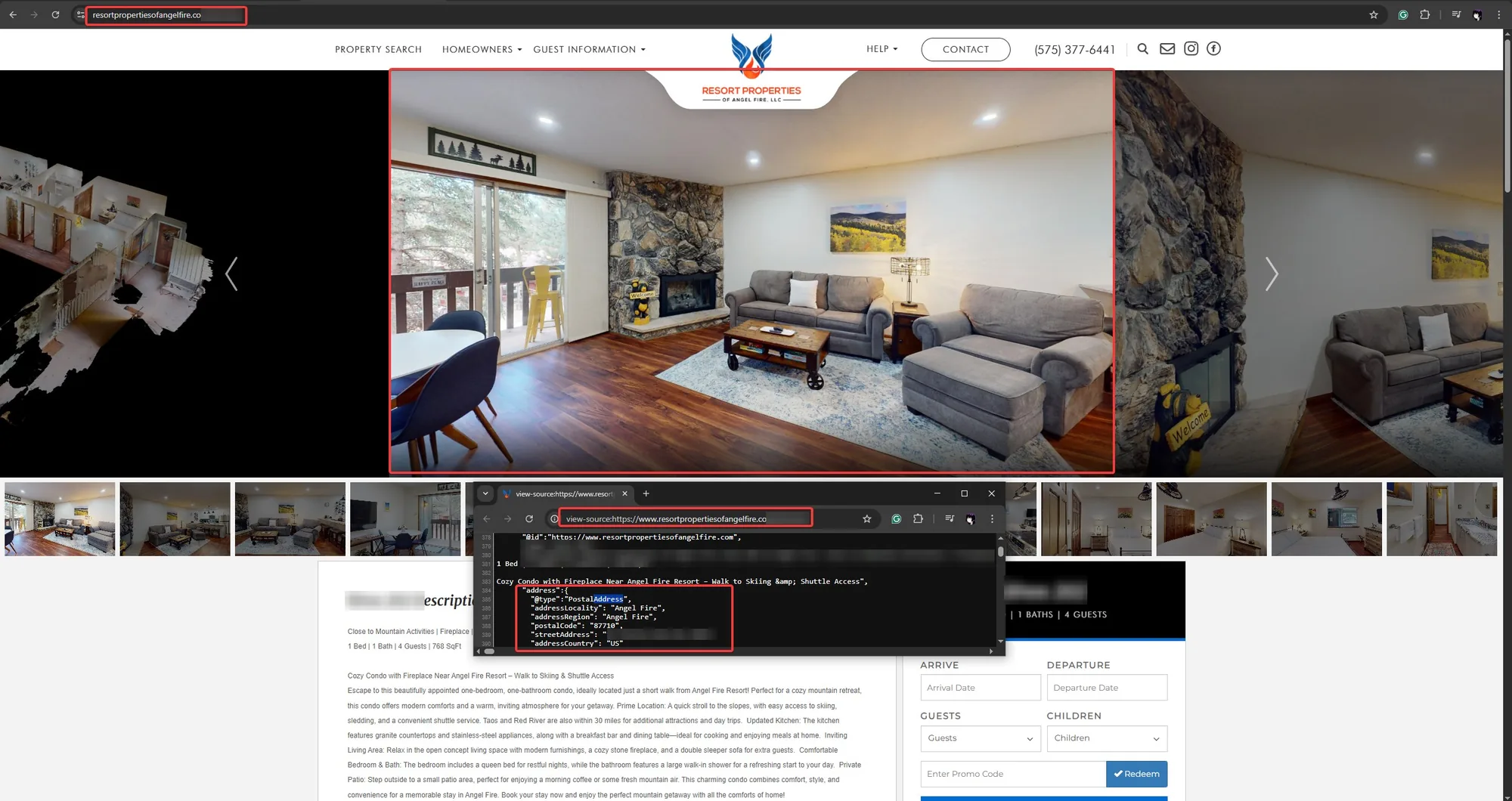
The address block includes the condo’s unit number.
Most owners never list on these sites directly. Their listings end up there because their manager or channel manager software sends the listing to as many sites as possible to fill more nights. That means you can do everything right on Airbnb and Vrbo and still have your address published on a site you’ve never heard of.
The unit number matters more than it might seem. For a condo or apartment, the street address alone points to a whole building, while the address with the unit number points to one specific door.
If your listing is syndicated widely, it’s worth asking your manager for the full list of sites it appears on, then checking a few of the smaller ones yourself.
What we can and can’t tell
From the outside, all we can see is what a site sends to the browser. In each case above, the address or other private details were in that data even though the page didn’t display them. We can’t see how any of these systems are built, so we can’t say for certain why it happens in each case or whether anyone is aware of it.
What we can say is that the problem shows up across very different companies, from large management platforms to small local sites, so it’s worth checking your own listing whoever you work with.
What it means for you
If your address leaks and your availability calendar is public, someone can work out exactly when your property will be empty. Vacant rentals are already an easy target for theft and break-ins, and this makes them easier to find.
Your guests are exposed too. The same information shows where a family is staying and for how long.
Your manager may not be aware of this either, since none of it is visible on the page itself, so it’s worth checking for yourself.
A note on where we stand: VeriStay works with cities, and address data in public listing pages is one of the ways a city can match a listing to a property and check its permit. That information is already public, and using it for enforcement is legitimate. Check-in instructions and door codes are a different matter. A city has no need for them, and we don’t collect them.
About this article. The findings above are based on publicly accessible listing pages, viewed between October 2024 and October 2026 using standard features built into every web browser, such as View Page Source and the developer tools. We didn’t log in, bypass any security measure or access anything that isn’t sent to every visitor. Each finding describes what we saw on the dates given, and the sites involved may have changed since. Screenshots have been edited to hide addresses, contact details and anything else that could identify a property, a guest or an owner. We didn’t keep any of that information from these listings or share it with anyone.
VeriStay isn’t affiliated with, endorsed by or sponsored by any of the companies named in this article. Company names and logos belong to their owners and appear only to identify the sites we looked at. This article is general information, not legal or security advice. If you believe anything here is inaccurate or out of date, contact us at [email protected] and we’ll review it and correct it where needed.